Professional menus in minutes, not weeks.
Start from your old menu (a photo, PDF, or spreadsheet) and AI turns it into a designed menu in your chosen style. Publish it to your website, Google Search and Maps, QR codes, TV screens, and print. Edit once and everything stays in sync.
Every new account tries Professional free for 14 days. No card needed.
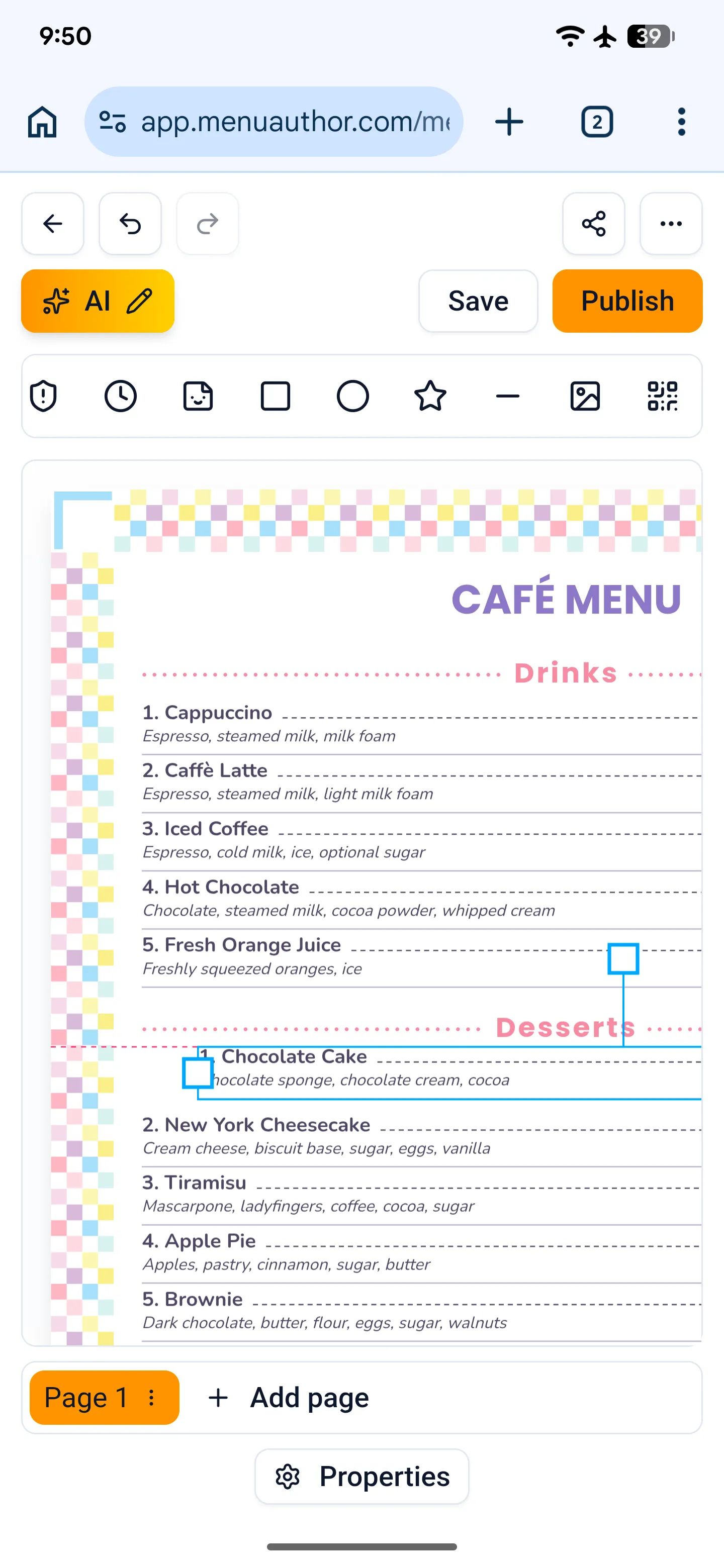
The full editor, now on your phone.
Everything the desktop editor does, on the phone in your pocket. It is the same editor, not a lighter version.
- Move and edit anything on the canvas
- Add dishes, sections, and images
- Switch pages and themes
- Undo, save, and publish
Built for menus, specifically.
Most design software treats a menu like any other document. Menu Author is built for restaurant menus specifically, so it handles the parts that actually matter: sections, dish photos, dietary tags, sizes and add-ons, currencies, and print-ready output.
Built for menus, not generic shapes
Real menu item blocks with names, descriptions, prices, price variants (Small / Large, Glass / Bottle), add-ons, and a sold-out toggle. Style one item and apply it to every other item in one click.
Let AI match your look
Describe the mood in plain words ('brighter, more casual brunch spot') and the theme adjusts to match. Don't like it? Reset to the original in one click.
Import the menu you already have
Paste your text, upload a PDF, photograph your printed menu, or import a spreadsheet. Prices come in correctly across more than two dozen currencies, and common dietary shorthand (v, vg, gf) is tagged for you.
Polish the wording
AI suggests sharper names and descriptions for dishes you've already written. You approve each one. Nothing changes unless you say so.
Publish everywhere at once
One menu powers your public link, QR codes, website, and signage. Change it once and everything updates, including the menu embedded on your own site, so you never wait on a developer to fix a price.
Photos, dietary tags, and allergens
Add a photo to any dish. Mark items vegan, vegetarian, or gluten-free, or create your own tags with their own colors. Declare any of the 14 EU allergens on a dish and a legend in your guests' language joins the menu automatically.
See what guests look at
Views over time, split by QR, website, embed, and signage. No cookies, no personal data, just simple counts that update live.
Run every location from one login
Manage multiple restaurants under one account, invite your team with the right level of access, and copy a menu from one location to another in a click.
Never lose a version
Every time you publish, we save a snapshot. Preview and restore any earlier version on demand.
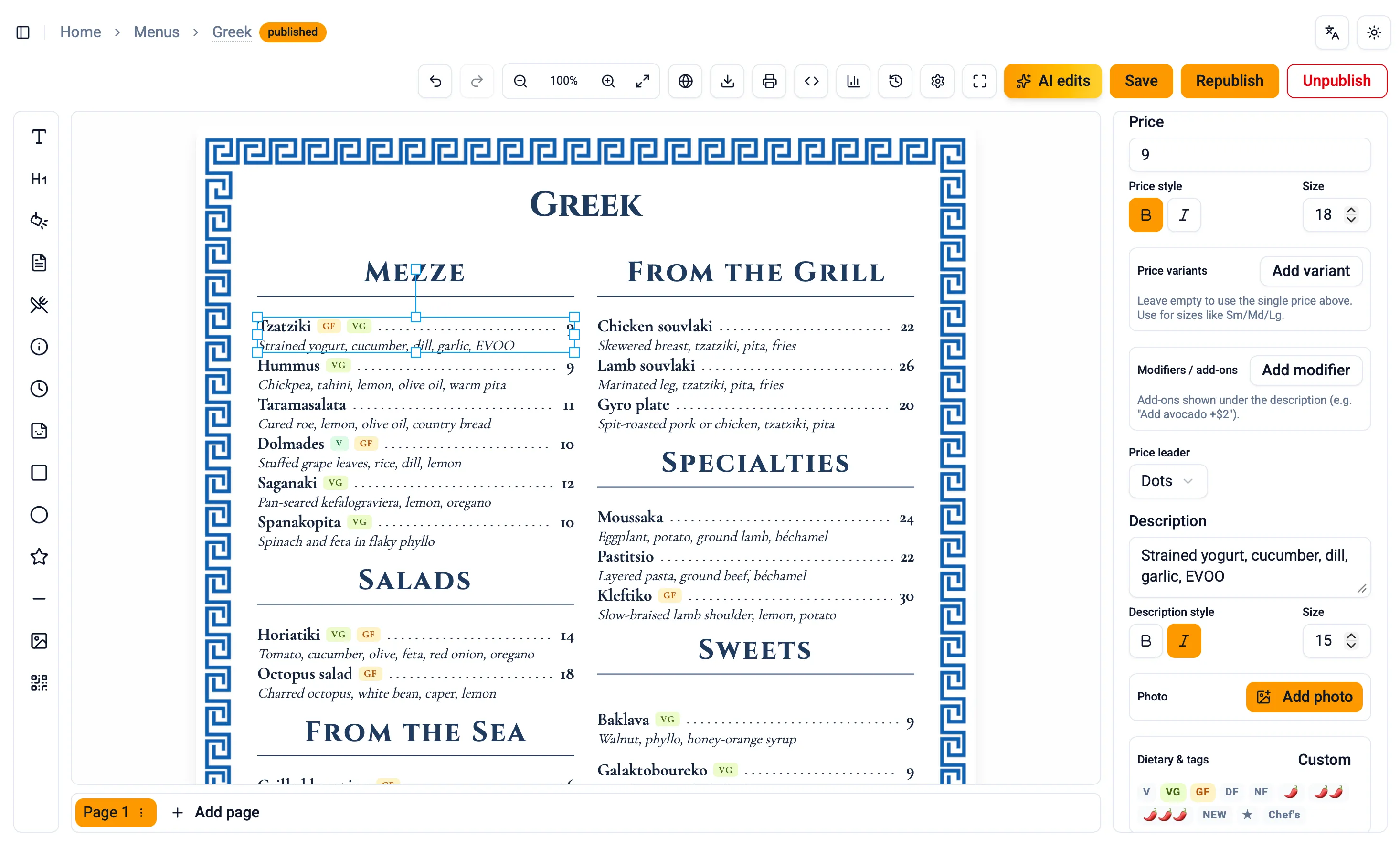
Design on the canvas, not in a spreadsheet.
Start from a blank page, a ready made theme, or one of your past menus. Edit text right on the menu, drag items to reorder, and never lose unsaved work. Build multipage menus, undo any change, and if a teammate is already editing, you'll see their name before you start.
Layout
- Things line up automatically
- Rulers, grids, and print safe-zones
- Column guides for multi-column menus
- Snap into place as you drag
Editing
- Edit text right on the menu
- Drag to reorder
- Move whole sections as a unit
- Style one item, apply to all
Safety
- Never lose unsaved work
- Warning before you leave
- No two people overwriting each other
- One broken item won't crash the rest
Output control
- Hide items from web, show only in print
- Pin decorations exactly where you want them
- Light, dark, or follow your computer
- Fullscreen mode
Four ways AI earns its keep.
No single mysterious "AI" button. Four focused tools: one for the look, one for building the menu, one for the words, and one for the languages your guests speak. Each shows you the result, and you decide whether to keep it.
Refine with AI
Describe the look you want in plain words. The colors, fonts, spacing, and layout adjust to match.
AI Menu Generation
Paste raw text, drop in a PDF, photograph your printed menu page by page (up to 10 photos), or import a spreadsheet. Prices come in correctly across more than two dozen currencies, dietary shorthand is tagged automatically, and it can even suggest EU allergen codes for you to verify, if you ask it to.
Polish with AI
Sharpen the names and descriptions on a menu you already have. You see each suggested change side by side and nothing changes unless you accept it.
| Before | Suggested | |
|---|---|---|
| ✓ | Burrata, peach, basil | Burrata & Stone Fruit, peach, torn basil, saba, aleppo chili |
| Tagliatelle brown butter | Hand-Cut Tagliatelle, brown butter, sage, 36-month parmigiano | |
| ✓ | Whole branzino, lemon | Whole Roasted Branzino, meyer lemon, castelvetrano, salsa verde |
Translate with AI
Serve the same menu in up to 27 languages. AI drafts every line, you approve what goes live, and each language gets its own link, QR code, and exports.
Pick a theme, not a blank page.
A curated gallery across casual to fine dining. Pick one and edit from there.
A web page for your menu that you can share.
Every menu gets its own fast, mobile friendly web page. Put the whole menu on your site, or just one part of it (drinks on the bar page, desserts on the pastry page). Work on a draft, preview it, publish when ready, and take it down in one click. Shared links look right in Google, on social, and in text messages. Connect your Google Business Profile (formerly Google My Business) and your listing on Google Search and Maps links straight to your menu, with your dishes, prices, and allergens updated every time you publish. Embed it on the website you already have, and every time you publish, that menu updates on its own. No code, and no emailing your web developer to change a price.
- Update it yourself, no developer
- Kept up to date on Google Maps
- Diners can filter by dietary need
- Embed the whole menu or one section
Make a QR code menu →Put your menu on a TV →The technical details →
Stop guessing what guests read.
See your views over time and where they come from: QR scans, your website, embeds, and signage. No tracking cookies and no personal data, just simple counts that update on their own.
Built for kitchens where mistakes are expensive.
Saved versions you can restore, no risk of two people overwriting each other, and a warning before anything goes live or comes down.
Version history
Every publish is saved. Roll back to any earlier version in one click. 10 saved on Professional, 30 on Ultimate.
No silent overwrites
When a teammate is editing a menu, you'll see their name before you start. Request a hand off in one click. Locks release when a tab closes.
Unpublish with a warning
Take a menu down only after a confirmation that warns embeds and QR codes will stop working.
Simple plans that scale with you.
Every new account tries Professional free for 14 days, no card required. After that, stay on the free plan forever or upgrade when you need more restaurants, more history, or more polish.
- 1 restaurant
- 1 menu
- 1 user
- Public URL + QR
- All print profiles
- No revision history
- Menu Author footer
- 2 restaurants
- 50 menus
- 5 users
- All channels · QR, embed, signage
- Advanced analytics
- 10 revisions retained
- Team roles & invitations
- Remove Menu Author branding
- Up to 5 restaurants
- Unlimited menus
- 10 users
- All channels · QR, embed, signage
- Advanced analytics
- 30 revisions retained
- Team roles & invitations
- Remove Menu Author branding
- Priority support
- Early access to new features
Questions, answered.
Can't find what you're looking for? The documentation covers every feature, organized by topic.
Browse the docs →