Your public menu page
Your public menu page is what diners land on when they open your menu link, scan your QR code, or click through from a search result or a shared link. Most of what shapes it is under Menu settings in the editor’s top bar.
Built for mobile
Section titled “Built for mobile”Published menus are built to render well on a phone, since that is how most diners open them, whether from a QR code at the table or a shared link.
Dietary filters for diners
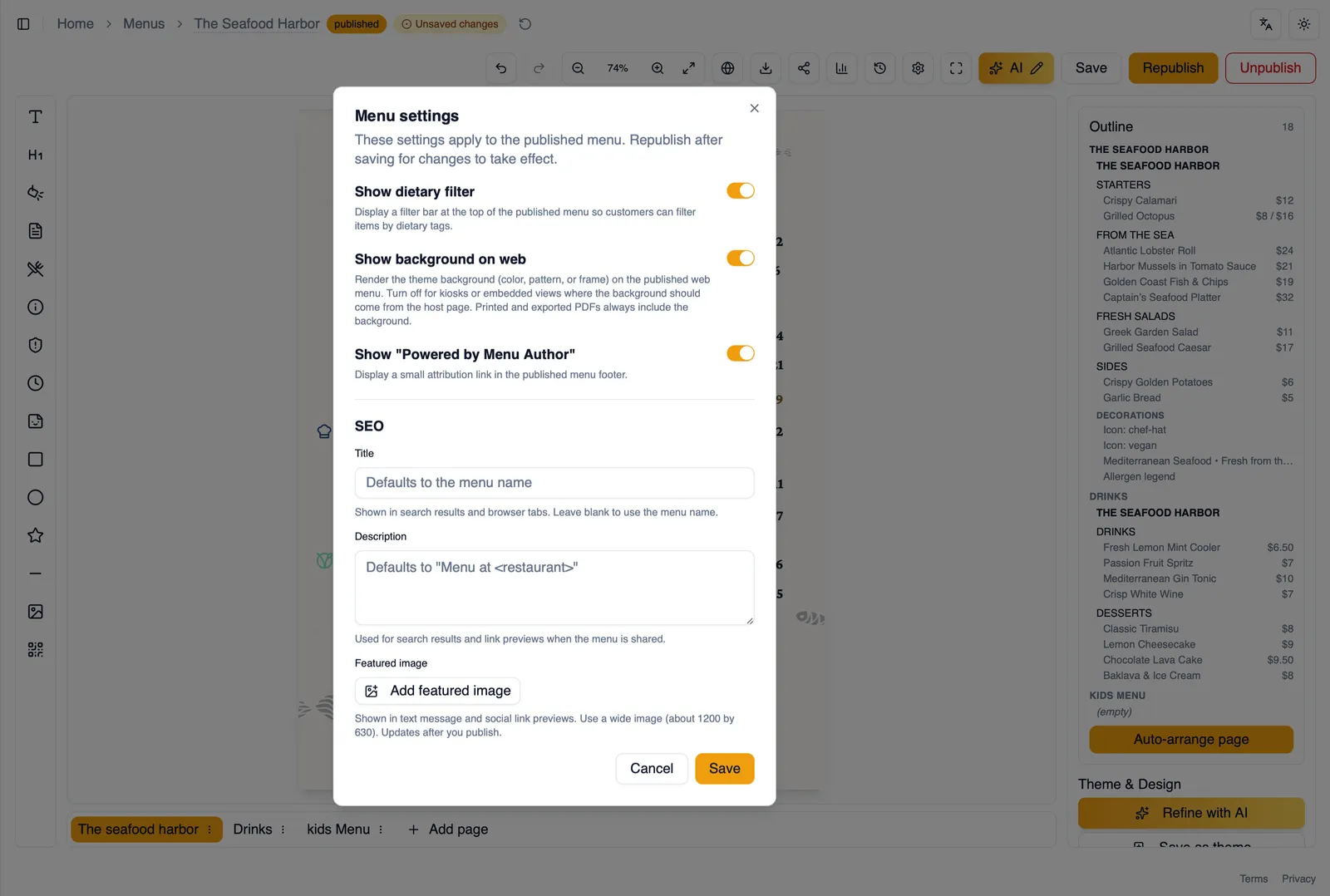
Section titled “Dietary filters for diners”Diners can filter what they see by dietary tag, letting them narrow the menu down to items marked vegan, gluten-free, and so on. Whether this filter shows up at all is controlled by the Show dietary filter setting. See Dietary tags for how those tags are set up in the first place.
The language bar
Section titled “The language bar”If your menu has translations, diners see a language bar for switching between them. A diner whose browser prefers one of your active languages is taken to that language automatically the first time they open the base menu link, and any flag they pick afterwards is remembered on their device. See Translate your menu for adding languages and approving translations.
SEO title and description
Section titled “SEO title and description”Set an SEO title and description for your menu so it shows up the way you want in search results and when it is shared elsewhere.
Featured image (paid plans)
Section titled “Featured image (paid plans)”A featured image is what shows up in link previews when your menu is shared, on social media, in messaging apps, and so on. Setting a featured image is available on paid plans.
Show “Powered by Menu Author”
Section titled “Show “Powered by Menu Author””By default, published menus show a small “Powered by Menu Author” credit. Paid plans can turn this off if you would rather your page carry no outside branding.
Show background on web
Section titled “Show background on web”Whether your menu’s background shows on the public page is controlled by Show background on web, covered in Backgrounds, patterns, and frames.
Accessibility
Section titled “Accessibility”Published menus are built to WCAG 2.1 AA: real text with headings and lists, a skip link, a keyboard-friendly dietary filter and language bar, and full names behind every dietary and allergen code for screen readers. Colors, fonts, and background images come from your theme, so keep body text at a contrast ratio of at least 4.5:1 and add alt text to photos. The full accessibility statement lists what Menu Author covers and the known limits.
Structured data and link previews
Section titled “Structured data and link previews”Published menus include structured data so search engines can understand and show rich results for your menu, plus Open Graph and Twitter card tags so links to your menu look right wherever they get shared.
How to set up your menu’s public page
Section titled “How to set up your menu’s public page”- Open Menu settings from the editor’s top bar.
- Fill in an SEO title and description.
- Set a featured image if your plan includes it, so shared links show a picture of your menu.
- Decide whether to keep or hide “Powered by Menu Author”, if your plan allows hiding it.
- Check the Show dietary filter setting matches whether you want diners filtering the menu themselves.
Next, see QR codes for getting diners from a printed table to this page.